
 Print
Print
|
|
|


Defect Database Tool (option)
In This Chapter |
Note: the Defect Database tool is an optional feature. To purchase this feature, please contact your Pressco Sales Manager. Additional hardware may be required, depending on your system. How to Contact Pressco.
The Series V Intellispec system is capable of archiving data associated with defective parts. The archiving of this data may be enabled or disabled. The defect data collected includes information related to the part program, lanes, inspections, sensors and correlated machine parts. The information can be from any type of sensor - camera, x-ray, mass, etc. The Defect Database tool allows you to search, view, and report defect information.
This information is valid as of 5.2.037 and 5.3.012 software.
What is the Defect Database?
The Defect Database is a tool within the Intellispec system that uses a separate hard drive used to archive information associated with rejected parts. This tool has two components:
- The Defect Data File that contains images of parts that have been rejected, and
- The Defect Database that stores defect information for each part that has been rejected.
Defect Database Specifications and Limitations
- The Defect Database is an option and therefore has to be part of the original install, or purchased as an upgrade.
- A separate hard drive is installed to support this database. A minimum 500GB hard drive is recommended.
- If your system has a part number 70315 or higher, then it is hardware-ready. This means that the system has the hardware capable of running the Defect Database.
- If your system has a part number below 70315, then additional hardware (hard drive and possibly memory) may be required. Contact Pressco.
- The Defect Database is maintenance-free.
- A separate database is created for each lane. You must enable the Defect Database individually for each lane.
- The Defect Database supports up to 500,000 records for each lane.
- The number of images available depends on the size of the Defect DB hard drive installed. You can see this information on the Intellispec screen on your system. (see example below) This total number of images is shared between all lanes. As defect images are written first-come first-served, more images are stored for a lane with a higher number of defects.
- There may be more records for all lanes than available image space. Therefore the oldest records may have no valid image associated.
- We cannot guarantee that all records and all images are saved because of memory constraints and available time for writing images to a hard drive.
- The Defect Database is designed to limit interference with the inspection system. This means that under high system load data may not be recorded as the database has to yield to the inspection system.
- The Defect Database file size is fixed. The entire hard drive space is allocated upon initial setup. When the database reaches its maximum number of records or images, it overwrites the oldest information.
- Example file size and number of images available:
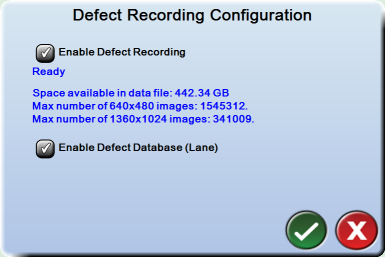
Note the following about the Defect Database
The information below refers to content you can find by using the Defect Database Viewer.
- Defect images can be accessed from the Defect Database by looking at details of a search result record.
- You can create defect rate reports over a time span for any or all part programs.
- You can search the database by criteria including:
- Part program
- Sensor
- Inspection (your name for the inspection, such as "Find Center")
- Inspection type (Intellispec inspection type, such as "Contrast")
- Sets of machine parts (such as "Cavity 3 through 10" or "Spindle 1 through 100")
- Time span of calendar dates and clock times
Print
|
Published: 2/18/2015 10:30:33 AM ©2015 ACME Ltd. All rights reserved. |
 |